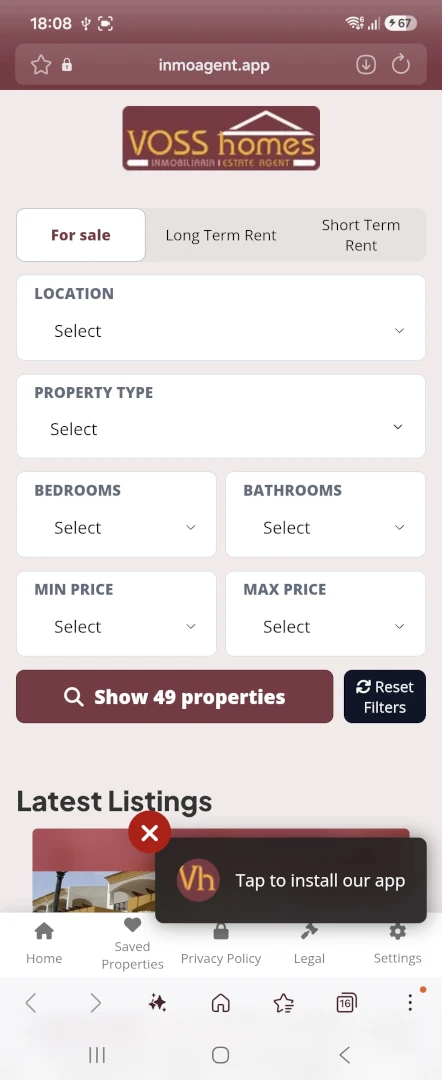
Your brand. Your colours. Your properties. Your app
Launch your own property app in 10 minutes
Automatically sync your listings from your existing website, send clients instant property alerts and let them install your branded app directly on their phone.
Automatically pull properties straight from your website and instantly turn them into a lightning-fast, branded Progressive Web App (PWA) that your clients can install on any device.
Automatic XML Feed Sync
Your property listings are automatically checked and updated around the clock according to your plan's sync frequency
Your Properties. In Your App
Keep using your existing website and property management workflow. InmoAgent automatically imports your listings and keeps your branded app synchronized.
Built-In International Reach
Manage and publish property details across English, Spanish, French, German, Italian, and Dutch to target international buyers.
Access Cached Properties Offline
Built with advanced PWA caching so agents and buyers can access properties, photos, and searches even in remote areas or basements with zero signal.
Automated Property Alerts
Automatically notify your clients the second new listings drop or prices update via the import cycle set in your plan - delivering real-time alerts straight to their installed PWA.
An Add-On, Not a Replacement
Keep your existing website and workflows. This is a nimble, dedicated tool designed to layer right in and bring true mobile-first power to your agency.
Stay connected after the first visit
Show clients how your app can fit naturally into their property search.
Push Notifications
Bring properties to clients' attention with notifications that can lead them back to the relevant listing.
Everything you need to know about InmoAgent PWAs and directory subscriptions.
Agent & PWA Management
A PWA (or Progressive Web App) is a lightning fast web app which can be installed on your mobile device exactly the same as an App from the App or Play Store. An InmoAgent Web App is dedicated to listing your properties and sending alerts to keep clients up to date the minute you update your properties.
No. InmoAgent works alongside your existing property website and imports your listings from a supported XML feed. You can offer your clients your own branded property app without replacing your current website or CRM.
You can configure your branding and launch your app in approximately 10 minutes, without needing a developer.
You'll need your agency logo, a square 512 × 512 px version of your logo for the app icon, your brand colours and a compatible XML property feed. Your brand colours should be available as HEX values (for example, #FFFFFF) or RGB values (for example, rgb(255, 255, 255)).
Yes. You can personalise your app with your agency's logo and colour scheme to match your existing brand as closely as possible.
Your property listings are imported automatically from your compatible XML feed. You don't need to enter each property manually.
Your property listings are imported automatically from your XML feed, which is checked at regular intervals according to your subscription plan. To update your agency biography, log in to the App Portal and use the dedicated biography page. You can enter your information in all six supported languages: English, Spanish, French, German, Italian and Dutch.
Yes. You can view your property app in a compatible web browser on mobile devices and desktop computers. The app can also be installed on compatible devices. Features such as push notifications depend on the device, browser and permissions.
Yes. InmoAgent uses Progressive Web App (PWA) technology, allowing clients to install your app on compatible iOS and Android devices and access it from their home screen.
Yes. Push notifications can help you alert clients to property updates, such as new listings and price changes, on supported devices and browsers where notifications are enabled.
No. InmoAgent is an additional marketing channel that works alongside your existing website and property management systems.
Yes. We offer plans for different portfolio sizes. Agencies with larger portfolios or high-volume feeds can contact us to discuss our Enterprise Agency plan.
Billing & Subscriptions
Yes. You can try InmoAgent free for 14 days.
There is no separate setup fee for standard self-service subscriptions. You configure your app's branding yourself through the setup process.
When you pay annually, you get 12 months of InmoAgent for the price of 10. That means two months free, regardless of your subscription plan. You can take advantage of this saving each time you renew annually.
You can request cancellation at any time. Please check your subscription terms for when cancellation takes effect and whether your app remains active until the end of your paid period.
The Solo Agent plan supports up to 75 properties, with your feed checked every 8 hours. The Large Agency plan supports up to 250 properties, with your feed checked every 4 hours.
Your 14-day trial gives you time to explore InmoAgent before committing to a paid subscription. To continue using your app after the trial, you'll need to select a suitable paid plan.
Yes. You can choose monthly or annual billing. Annual subscriptions give you 12 months for the price of 10.
If your business needs change, contact us to discuss moving to a more suitable plan. We'll explain the applicable pricing, property limits and synchronisation frequency before the change is made.
InmoAgent imports properties from your XML feed until your plan's property limit is reached. Additional properties beyond that limit will not be imported. If your portfolio grows, contact us to discuss upgrading to a plan with a higher property allowance.
The Enterprise Agency plan is designed for agencies with larger portfolios or high-volume feeds. It offers more tailored arrangements, with pricing available on request.
Yes. We can discuss a separately quoted, custom-hosted setup for agencies that want their app deployed on their own server, potentially with additional white-labelling or data-control options.
Technical Questions
No. The standard setup is designed to be self-service. You'll need your branding details and a compatible property feed, but you don't need to develop an app or have specialist technical knowledge.
InmoAgent is designed for compatible modern browsers and devices, including iOS and Android. Installation steps and features may vary depending on the device, operating system and browser.
Yes. InmoAgent supports compatible XML feed formats, including InmoAgent custom XML, Kyero v3 XML and Spain Property Portal XML. The InmoAgent custom XML format is recommended because it includes the information required by our platform. If you don't have a compatible feed, ask your website provider whether they can supply one, or contact us for guidance.
The InmoAgent custom XML is designed to populate all of the specifications on the app. From the basics such as price, location, number of bedrooms and photos, to the more specific things like property condition and market status like Sold, Under offer or Rented.
You can see an example of our custom XML feed here or a detailed explanation in plain text format here
Feed synchronisation frequency depends on your plan:
Free Trial: every 12 hours
Solo Agent: every 8 hours
Large Agency: every 4 hours
Enterprise Agency: every 2 hours
Not necessarily. Property changes are imported during the next scheduled XML feed synchronisation, so there may be a delay before they appear in your app. You can see when your next import is due in your Inventory Status when you log into the agents portal.
Yes. InmoAgent supports English, Spanish, French, German, Italian and Dutch.
Not on every device or browser. Availability depends on the operating system, browser support and notification permissions. Some devices may require you to install the app or change your notification settings.
If your XML feed becomes unavailable or contains errors, property updates may not be imported. Contact us for assistance if you suspect your feed has stopped working.
For Property Buyers
Yes. Property listings are imported from estate agencies' websites via their property feeds. InmoAgent provides the technology that connects estate agencies with property seekers; it does not act as the estate agent or independently supply property details. For confirmation of a property's availability, price or other details, please contact the agency responsible for the listing.
Open the app link provided by the estate agency or select an app from the InmoAgent directory, if available. Follow the installation instructions for your device and browser. You can also browse the app directly in your browser without installing it.
No. As a Progressive Web App (PWA), it can be installed directly from a compatible browser without using the Apple App Store or Google Play Store.
Yes. Browsing properties through the app is free for property buyers. Contact the estate agency if you have questions about any separate services or charges it may offer.
Browse the available listings and use the search or filter options provided by the app to narrow down properties that match your preferences.
Yes. On compatible devices, you can install the app or add it to your home screen for easier access.
Yes, if you enable notifications on a supported device. Where available, you can customise your preferences to receive alerts for properties that interest you, using filters such as location, property type, number of bedrooms and price. Notification delivery depends on your device, browser and notification permissions.
Listings are updated from the estate agency's property feed, but changes may not appear immediately. Contact the agency responsible for the listing to confirm availability, price and other details.
Open the property listing and use the contact form, where available, to contact the estate agent directly. You can ask questions about the property or arrange a viewing with the agency.
Please contact the estate agency responsible for the listing. The agency can help with property details, availability, viewings and other enquiries.